Everything you need to capture,
edit, and finish a screenshot.
From full-page capture to permanent redaction and presentation-ready canvases, PageSnapper keeps the entire screenshot workflow inside your browser.
Capture exactly the part of the page you need.
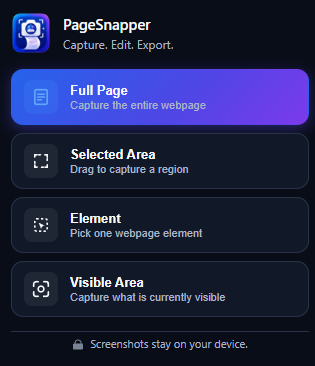
PageSnapper provides four specialized capture mechanisms directly from the Chrome extension popup, ensuring you never have to crop outside the tool.
Full Page
Capture an entire webpage from top to bottom.
- Automatic page scrolling from header to footer
- Stitched into one continuous high-resolution image
- Suitable for long documentation, articles, dashboards, and landing pages
Selected Area
Drag to choose a precise region of the visible page.
- Flexible rectangular selection overlay
- Adjust or redraw the box before finalizing capture
- Only the chosen region enters the editor canvas
Element
Hover over page elements and capture the element you select.
- Interactive visible element boundary highlighting
- Inspect and click to target cards, tables, menus, or modals
- Precise element-bound capture without background bleed
Visible Area
Capture exactly what is visible in the current browser viewport.
- Instant one-click screen capture
- No region selection or scrolling required
- Ideal for quick visual snapshots and rapid bug reporting
A focused screenshot editor, built into the workflow.
Immediately upon capture, your screenshot loads in PageSnapper’s native browser editor. Annotate, crop, and explain with full vector fidelity.
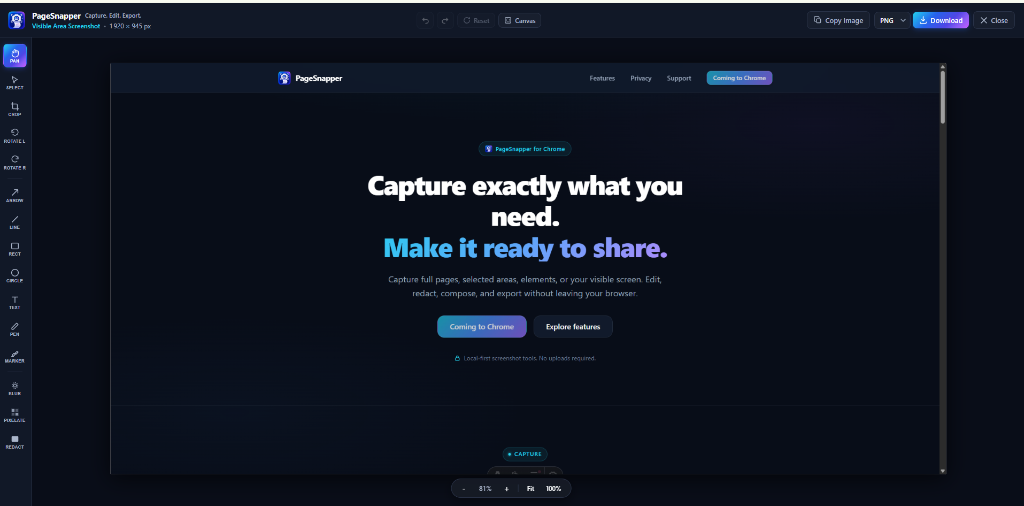
Navigate & Adjust
Positioning, framing, and viewport navigation tools.
Annotate & Explain
Vector shapes, typography, and highlighter markup tools.
Share the screenshot - not the sensitive details.
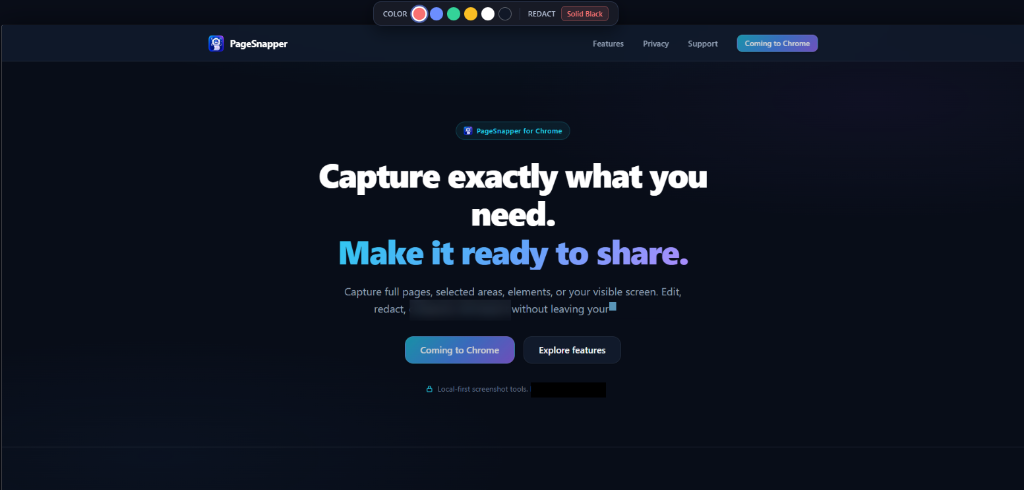
Protect credentials, client information, and private data before sharing. Apply selective blur, mosaic pixelation, or permanent redaction right inside your browser.
Blur Tool
Obscure sensitive content while preserving the surrounding visual layout and context.
Best for non-critical names, background elements, avatar faces, and general visual dampening.
Pixelate Tool
Convert sensitive rectangular regions into coarse, completely unreadable mosaic blocks.
Best for phone numbers, transaction IDs, addresses, and secondary account identifiers.
Permanent Redaction
Cover private information with solid opaque color blocks flattened directly into the export.
Best for API keys, passwords, financial records, authentication tokens, and confidential credentials.
Permanent Redaction is flattened into exported raster images so the covered visual content is excluded from the final output. For highly sensitive information, always verify the exported file before sharing.
Go from raw screenshot to presentation-ready graphic.
PageSnapper places your captured screenshot inside a dedicated output canvas without destructively modifying your original capture coordinates. Frame, style, and polish before publishing.
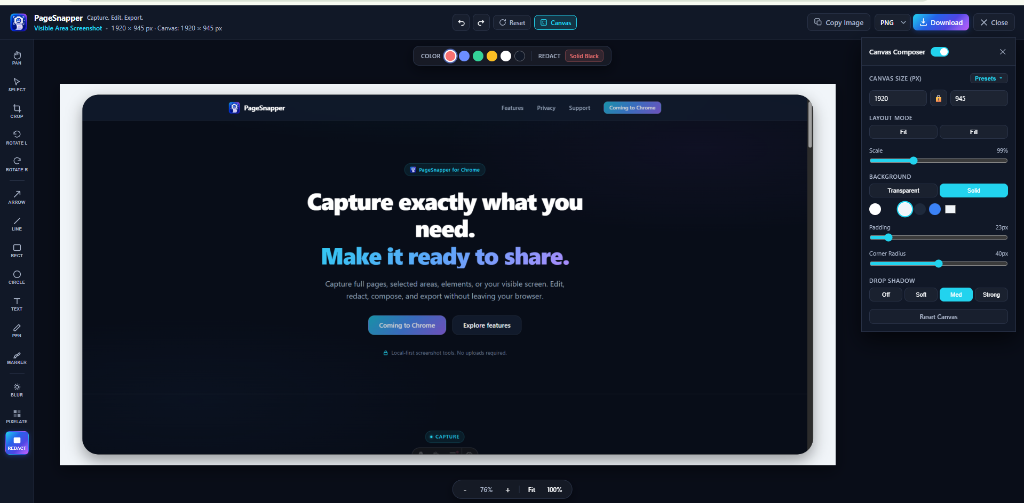
Canvas Sizing
- Custom width and height in exact pixels
- Instant presets for square (1080×1080), story (1080×1920), and video frames
- Landscape, portrait, and custom ratio framing
Placement & Scale
- Fit mode: Keep the entire screenshot visible inside the canvas
- Fill mode: Expand the capture to fill the entire frame
- Fine-grained scale slider (1% to 100%) and interactive drag repositioning
Background Styles
- Transparent background for clean embedding in slides and websites
- Solid color fills with integrated color swatch picker
- Matches dark, light, or branded presentation themes
Frame Elevation
- Configurable outer padding slider for comfortable breathing room
- Adjustable corner radius (up to 40px) for smooth modern edges
- Multi-tier drop shadow depth presets: Off, Soft, Medium, Strong
PageSnapper includes built-in output dimensions for common sharing platforms (Square, Story, Feed, Video). Presets prepare your image at exact target canvas ratios for manual posting and documentation.
Your screenshot. Your format.
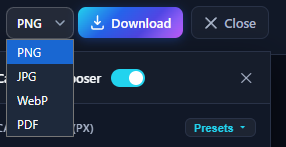
Download your capture in your target format or copy it straight to your clipboard for instant sharing across your favorite apps.
PNG Format
Lossless compression preserving crisp pixel edges, typography, and alpha transparency.
JPG Format
Compact lossy compression with adjustable output quality controls for bandwidth efficiency.
WebP Format
Modern web image format balancing high fidelity with small file sizes.
PDF Document
Paginated document output suitable for archiving, with automatic multi-page support for long captures.
Copy to Clipboard
Puts the rendered screenshot directly onto your system clipboard with zero file footprint.
Complete screenshot tools without sending your images away.
PageSnapper operates strictly as a local-first browser extension. Your confidential captures, sensitive code, and internal dashboards are processed on your device.
Local Browser Processing
Capture processing, vector annotations, and canvas rendering execute directly inside your Chrome browser sandbox.
- Zero remote image uploads to PageSnapper servers
- Instant rendering with zero round-trip network lag
- Confidential documents and intranet pages remain strictly on your machine
No Account Required
Use the complete capture, edit, redact, compose, and export workflow immediately without creating an account or logging in.
- No email, password, or sign-up forms required
- No session cookies or cloud credentials stored
- Full product capability available upon installation
Zero Telemetry & Tracking
PageSnapper v1.0 is engineered with clean code containing zero third-party telemetry, tracking pixels, or advertising beacons.
- No user behavior analytics tracking
- No third-party SDKs or remote data collectors
- No data harvesting or usage profiling
Temporary Local Browser Handoff
During the handoff between capturing a webpage and opening the full-tab editor, PageSnapper may temporarily utilize your browser’s local client-side storage (such as IndexedDB). This data remains strictly inside your local browser instance and is never transmitted to any external server.
Capture. Edit. Protect. Compose. Export.
Every capability lives inside one unified extension. Stop at step one for instant captures, or run through the entire pipeline for published graphics.
Capture
Grab full pages, custom regions, DOM elements, or your visible browser viewport.
Edit
Add arrows, geometric shapes, contextual text, pen lines, and marker highlights.
Protect
Conceal passwords, tokens, and PII with blur, pixelation, or permanent redaction.
Compose
Format on custom canvas backgrounds with outer padding, rounded corners, and shadows.
Export
Download crisp PNG, JPG, WebP, or PDF files, or copy directly to your clipboard.
Flexible Pipeline: A rapid viewport snapshot can be copied in one second, while a polished documentation asset can be fully cropped, redacted, composed, and exported as a multi-page PDF.
Ready when your
screenshot is.
PageSnapper is available on the Chrome Web Store. Full-page captures, vector annotations, privacy redaction, canvas composer, and multi-format exports directly in your browser.